Scheduled Tasks
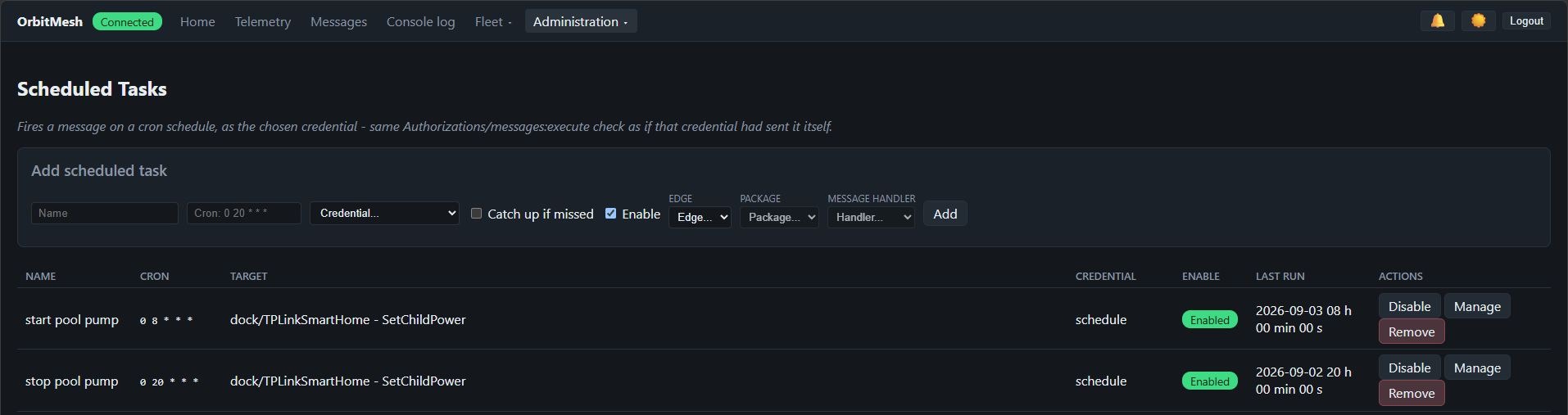
Fires a message on a cron schedule (Console → Administration → Scheduled Tasks) - the automation equivalent of a human opening the Messages page and clicking Invoke.
How it runs
Each task runs as a chosen credential, through the exact same checks as any other sender: Authorizations (per-target Allow/Deny) and the messages:execute scope. A schedule is another caller of the permission model, not a way around it - if the credential can't send the message by hand, the schedule can't either.
Picking the target
Edge, Package and Message handler are dropdowns backed by real connected packages and their actually-declared [MessageHandler]s - the same data the Messages page shows - not free-typed names. Parameters are generated from the handler's own declared signature, to rule out a typo'd key or parameter going unnoticed in an unattended, timer-triggered send.
Missed occurrences
An occurrence missed while the Server was down (update, crash, network...) is skipped by default - the next normal occurrence still fires on schedule. Turn on "Catch up if missed" to fire once instead, bringing state back in line - never once per missed occurrence.
Cron syntax
Standard 5-field cron (minute hour day month day-of-week), parsed by Cronos. Evaluated in the Server machine's local time.
See Access control for the messages:execute scope, and Messages for how message handlers work.